Most of the curriculum that comes past me is either written to be used in a home school or in a formal classroom. The Write Foundation's curriculum takes a new direction, as it was originally designed for a once a week co-op.
The author, Rebecca Celsor, states that this program and its levels "were originally written for students who struggled with and hated writing." She feels these kids struggle because the process of writing has never been broken down for them, so they could see patterns and transitions in writing. The author uses a variety of techniques (outlines, formal writing, logic problems, and poetry) to give the students ample practice in developing these skills.
The Write Foundation has three levels in their heavily Christian based curriculum.
Level 1: Sentence to Paragraph Writing for ages 11-13
Level 2: Paragraph Writing for ages 12-15
Level 3: Essay Writing for ages 14-17
Factors to consider when choosing a level are whether a child likes to write, how well they write, and their maturity level. Even though Dragonette is 13, I chose the Essay Writing Level. She is a copious fiction writer and knows the basics of non-fiction writing.
Essay level is divided into 30 lessons, ranging from outlines of paragraphs, to a research paper in MLA style, to timed essays. Poetry and logic problems (Mind Benders, sold separately) are also thrown into the mix. I was only provided with the first 15 lessons, so I cannot give an assessment on the whole program.
Included are loose-leaf student pages, a spiral bound teacher's guide with all the answers to the student worksheets along with Teacher Presentation pages, and a cd with all of the Teacher Presentation pages that can be printed or put on an overhead.
In the spiral teacher's book, the first 19 pages discuss how to use the program. There are suggested schedules, a syllabus, a grading system, and explanations of each component of the program and its vocabulary. Each lesson in the book has a list for that week. All instruction is to be covered in one day (the co-op meeting) and the assignments are then completed at home. The book takes you page by page through the student pages, telling you how to introduce these to the students. The last page of each lesson is a breakdown for that week. It includes what was covered in class and what is expected to be done as homework.
I was excited to receive this program. I have covered some formal writing with Dragonette, and hoped this program would fill in any holes and take us to a higher level of writing. It was a hard program to wrap my mind around at first. The introduction is very wordy, there are typographical errors throughout, and things are not always introduced in the order they are used. By the 4th lesson, I started to understand the program and where the author was taking us. But other than some new poetry forms, and talking about passive voice, I had already covered everything in lesson 1-15 with Dragonette. I think we would have gotten more use out of this program if we had had the second half (lessons 16-30). This is where the research paper and timed writing is covered, both things that we have not covered.
Because of the wordiness, the typos, and the poor paragraphs used for practicing outlines, I was ready to chuck this curriculum out the window. At first. But the more I sat with it, I realized that this program is really an unpolished gem. If the program was given a serious edit, it could be a solid program to use in a co-op setting. If it is going to marketed to be used in a single home school, it also needs to be edited for that, instead of expecting you to modify the schedule on your own. And personally, even though I am a Christian, I found the examples used throughout the book to be extremely preachy and poorly written. It feels that the program is not sure whether it wants to be a evangelizing tool or a writing program. So as it stands now, the first half of this program is a vague outline of what you should cover in a beginning writing class, but you may need to be prepared to come up with different examples to illustrate your points. Perhaps the program does improve in lessons 16-30, but since they were not provided for me to try, I cannot offer an opinion about the second half. If the author does have the program edited, it would absolutely deserve a second look.
If you decide to order this program there are a variety of pricing options.
Whole Program w/ lessons 1-30 (student pages, teacher book, and cd) $100 + tax and shipping
Half Program w/ either lesson 1-15 or 16-30 (student pages, teacher book, and cd) $65 + tax and shipping
Instruction Manual $75 + tax and shipping
CD $15 + tax and shipping
Worksheets $25 + tax and shipping
And you are worried about grading writing for your student, the author is also offering a grading option.
Wednesday, November 10, 2010
Friday, November 5, 2010
Book Collector by Collectorz
No matter how digital the world becomes, books will always have a place in my life. Kindles are cool, but I cannot imagine taking one to the beach or curling up to read one with a child.
Since I choose to stay firmly in the world of the old-fashioned book, I have to deal with the old-fashioned way of organizing books. And how many times have I been to a fill a box for $5 book sale and had to ask the old-fashioned question, "Do we own this or did we check it out from the library?"
But it gets more complicated than that. My husband collects books. Instead of golf clubs or season tickets, he has his own glass-fronted book shelves. Ask him what he owns, and he'll give you a vague answer, rather than risking damage to the covers of his treasures to properly answer the question. Throw in the task of keeping track of a voracious reader's school and pleasure reading for college applications and the chaos is enough to make anyone want to hide behind that stack of books yet to find a shelf.
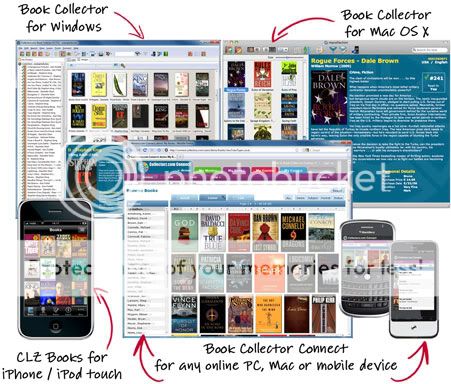
So when asked to use and report back on the Book Collector Pro Edition version 7.0 by www.collectorz.com, I was excited, and hesitant, and a bit overwhelmed.
After downloading the program and playing with the sample file, I started with my husband's books. The age of his books range over 100 years. Editions and publishers matter. He needs to know if it was signed or if the dust jacket was missing. In other words, if Book Collector could handle his books, they could handle any of our books.
I started a file, read the online help, and began entering books. Since my husband needs so much data about his books, I chose the "Add Book Automatically" feature. I enter the ISBN, author, or title and Book Collector searches for possible matches. I can search for one book at a time or enter a list of books into a queue and search for the whole queue at once while I go do something else. But no matter the search, the program provided me with a list, which included data such as publisher, book cover, number of pages, hard or soft cover, and publication date. I then used this data to choose the correct copy. If the edition I was looking for did not appear, I could manually add the information I had, instead of choosing an edition that was not quite right. Then I could add all sorts of info, including personal data (date read, purchase price, current value, and location), story info (character, plot, and genre info), and whether I owned it, wanted to acquire it, or had loaned it to someone. And I could customize what information I wanted to be visible in the list of books I had added to this folder and how I wanted the books sorted.
Next I decided to make a reading list for Dragonette. She has been keeping track of what she has read in a spiral notebook, but I need something spiffier for colleges. I only need to know title, author, and when she read it. This was sparse information compared to what Book Collector can do, so I had to rethink the best way to add books. It was easier to pick "Add Book Manually" and use keyboard shortcuts without asking the program to search for more information. Since the copyright and publisher did not matter, the search was overkill. Once I entered a few books, I could go into a record, and by jumping from book to book using the keyboard shortcuts, add the date she finished the book. This went so much faster than trying to add her books automatically.
Once I finish these lists, I may make a folder of all the books we own. Since I am an analog person living in a digital world, this would not have been my first move. But this is suggested for insurance purposes. That way, if Mother Nature did come a-knockin', I would have that list (which I had placed in a safe location) for the insurance adjuster. Books do make up a lot of our assets because we have a house and a school under our roof. Plus, it would be really cool to know how many books we own. And I could play with Book Collector's statistics mode, and make graphs by genre or character, or see data on average and total purchase price, value, and pages. Way cool.
Book Collector does have the option to use scanners and smart phones for adding books and keeping track of such. I have neither, so I was not able to investigate these options. You can also add a Connect account, which allows you to publish book lists online.
Book Collector is a powerful piece of software and I can see it being utilized by small libraries. But it can be used for simpler jobs, like Dragonette's book list. If book collecting is not your thing, www.collectorz.com also offers software for music, movie, comic, game, mp3, and photo collections.
Book Collector is available in Standard ($24.95) and Pro ($49.95) editions. Honestly, I don't really understand the difference between the two, because there is a lot of technical jargon used, and I couldn't begin to explain it. Click here to go to the web page and choose the "?" beside "Standard" and look at the list yourself. You will also find price lists for all the extra features you can add to a Standard or Pro edition for all the collectorz software. And you can try out Book Collector to see if it is right for you with a 100 book trial by clicking this link and looking on the right side of the screen.
Since I choose to stay firmly in the world of the old-fashioned book, I have to deal with the old-fashioned way of organizing books. And how many times have I been to a fill a box for $5 book sale and had to ask the old-fashioned question, "Do we own this or did we check it out from the library?"
But it gets more complicated than that. My husband collects books. Instead of golf clubs or season tickets, he has his own glass-fronted book shelves. Ask him what he owns, and he'll give you a vague answer, rather than risking damage to the covers of his treasures to properly answer the question. Throw in the task of keeping track of a voracious reader's school and pleasure reading for college applications and the chaos is enough to make anyone want to hide behind that stack of books yet to find a shelf.
So when asked to use and report back on the Book Collector Pro Edition version 7.0 by www.collectorz.com, I was excited, and hesitant, and a bit overwhelmed.
After downloading the program and playing with the sample file, I started with my husband's books. The age of his books range over 100 years. Editions and publishers matter. He needs to know if it was signed or if the dust jacket was missing. In other words, if Book Collector could handle his books, they could handle any of our books.
I started a file, read the online help, and began entering books. Since my husband needs so much data about his books, I chose the "Add Book Automatically" feature. I enter the ISBN, author, or title and Book Collector searches for possible matches. I can search for one book at a time or enter a list of books into a queue and search for the whole queue at once while I go do something else. But no matter the search, the program provided me with a list, which included data such as publisher, book cover, number of pages, hard or soft cover, and publication date. I then used this data to choose the correct copy. If the edition I was looking for did not appear, I could manually add the information I had, instead of choosing an edition that was not quite right. Then I could add all sorts of info, including personal data (date read, purchase price, current value, and location), story info (character, plot, and genre info), and whether I owned it, wanted to acquire it, or had loaned it to someone. And I could customize what information I wanted to be visible in the list of books I had added to this folder and how I wanted the books sorted.
Next I decided to make a reading list for Dragonette. She has been keeping track of what she has read in a spiral notebook, but I need something spiffier for colleges. I only need to know title, author, and when she read it. This was sparse information compared to what Book Collector can do, so I had to rethink the best way to add books. It was easier to pick "Add Book Manually" and use keyboard shortcuts without asking the program to search for more information. Since the copyright and publisher did not matter, the search was overkill. Once I entered a few books, I could go into a record, and by jumping from book to book using the keyboard shortcuts, add the date she finished the book. This went so much faster than trying to add her books automatically.
Once I finish these lists, I may make a folder of all the books we own. Since I am an analog person living in a digital world, this would not have been my first move. But this is suggested for insurance purposes. That way, if Mother Nature did come a-knockin', I would have that list (which I had placed in a safe location) for the insurance adjuster. Books do make up a lot of our assets because we have a house and a school under our roof. Plus, it would be really cool to know how many books we own. And I could play with Book Collector's statistics mode, and make graphs by genre or character, or see data on average and total purchase price, value, and pages. Way cool.
Book Collector does have the option to use scanners and smart phones for adding books and keeping track of such. I have neither, so I was not able to investigate these options. You can also add a Connect account, which allows you to publish book lists online.
Book Collector is a powerful piece of software and I can see it being utilized by small libraries. But it can be used for simpler jobs, like Dragonette's book list. If book collecting is not your thing, www.collectorz.com also offers software for music, movie, comic, game, mp3, and photo collections.
Book Collector is available in Standard ($24.95) and Pro ($49.95) editions. Honestly, I don't really understand the difference between the two, because there is a lot of technical jargon used, and I couldn't begin to explain it. Click here to go to the web page and choose the "?" beside "Standard" and look at the list yourself. You will also find price lists for all the extra features you can add to a Standard or Pro edition for all the collectorz software. And you can try out Book Collector to see if it is right for you with a 100 book trial by clicking this link and looking on the right side of the screen.
Friday, October 29, 2010
TOS 2010-2011 High School Planner
In August, I blogged about The Old Schoolhouse Planner (click here). This is a mammoth book full of sheets to organize and enrich your life. TOS is going one step further, and they are now making planners that are specialized to different age groups. This time I got a good look at the e-book The 2010-2011 High School Schoolhouse Planner ($29.00) for this review.
My daughter Dragonette has started high school and so I have researched what I need to do to help her have a successful journey to college. Beyond the usual topics needed for a high school diploma, I have to teach time organization, and how to plan to organize her time. In other words, teaching not only due dates and not procrastinating but how to use an organizer or calendar for organization, and how to coordinate her paperwork with the things running around in her head.
I think this planner is a big step in the right direction. There is duplication from the original planner, such as Bible reading schedules and book logs. But this planner leaves out pages a high schooler would not need. Along with calendars, organizing sheets, and more ways to make a list than you can shake a stick at, there are articles about planning a high school career while looking towards college. Included is a parent supplement that is a good starting point for learning what questions you need to ask to home school a child through high school. And because it is an e-book, you can selectively print the pages you need to create a personalized planner for both parents and high schoolers.
Pages that stood out to me:
High School Transcript
Sample Course of Study for College
High School Plan
High School Hours Tracking Log
Books Read this Year (many colleges ask for a books read list)
Classes I Would Like to Create
Vocabulary Study Sheet
Possible Future Plans
Interest and Career Ideas
Extracurricular Activity Schedule
If you are starting your high school journey and have not done the research, the forms in this book will give you an idea of what kind of records you will need to keep. High school record keeping is not like elementary school record keeping, unless maybe you live in a state with tough homeschooling laws. Other than math, we have never used boxed curriculum, and it is not unusual for us to create classes by piecing things together from a variety of sources. That makes my record keeping challenging, because I cannot just list a table of contents and say we did all of the things this book told us to do. Not only do I need to make sure I hit all the topics in a course, but I need to make sure I document all of the projects, books, and field trips that went into that class. And since I will need to create transcripts, class descriptions, a books read list, volunteer and extra curricular activity logs, and a school philosophy for college applications, as well as be a mom, teacher, curriculum creator, and guidance counselor to my daughters, I have got to be super organized as soon as we start high school classes instead of waiting until Dragonette's 11th grade year.
The first thing I did was fill out the "Classes I Would Like to Create" sheet. Each sheet is an interactive pdf, which means I can type my thoughts right into the form and print it out (much more readable than my chicken scratch). I have seen sheets like this before, but there was something about the format of this particular one that struck a creative chord and allowed me put on paper some ideas that have been swirling in my head. This was a double bonus, as I checked this off the To Do list and freed up some brain space!
My next task was to use the information in the planner to guide my daughter. She is now keeping a calendar with due dates and already has a book log. We have worked on a tentative High School Plan. Next I think I will bring out the Possible Future Plans list. I don't want to overwhelm her, but I do want her to steadily take her education into her own hands, as she will need these skills in college.
Every home school journey is different, even within a family. Once high school coursework starts, a home school mom has to be on top of her game. Perhaps this is why so many home schoolers send the kids to brick and mortar schools for high school, but that has never been an option at our house. So I appreciate items like The 2010-2011 High School Schoolhouse Planner, because they assist me in planning and presenting my children's very personalized education in a format that any college administrator can understand.
Friday, September 24, 2010
Schleich Animals
Sometimes in our quest to give our kids the best education we can, we forget that curriculum is more than books, math manipulatives, and answer books. I was reminded of this when I received a box of Schleich figures in the mail.
Schleich is a German company that prides itself on their hand painted, durable, molded figures. The catalog divides the 500+ available figurines into:
World of Nature
-Wild Life
- Farm Life
World of History
- Prehistoric Animals (each of these comes with a booklet of information)
- The World of Knights
- The World of American Indians
World of Fantasy
- Bayala
- Iloris
- Arelan
- The Smurfs (yes, the blue ones from your childhood)
| Schleich figures I received (ignore the green patch --that's a homemade saddle) |
All the figures we received were from The World of Nature. This includes a gnu, a gnu calf, a horse, a Dartmoor Pony, an okapi, an elephant, a donkey, and a piglet. These figures, while plastic, are a heavy plastic that reminds me of a hard rubber. The figurines feel solid in your hands, and are balanced to easily stand up. And unlike cheaper figurines, the eyes are painted in the right place and the markings on the animals are very realistic, including the silver horseshoes on the Dartmoor pony.
| Silver horseshoes on Dartmoor Pony |
These could easily be played with and inspire the right questions, like "Where does this animal live," or "What is it closely related to," instead of "Why won't this darn animal stand up," or "Why is its eyes crooked," or "Does that color combination really occur in nature?"
I really liked the quality of these animals, and although my kids have mostly outgrown the farm animals, Dragonette was thrilled to see an okapi, a favorite animal of hers that it seems no one else has ever heard of. My kids were very interested in the Bayala group of figures in the catalog, and I loved seeing the Smurfs, which were a favorite in my house growing up. So I guess you could say there is a figurine available for all ages in this catalog.
While you can see the full catalog on line, you cannot buy directly from the company. You can search for a local retailer (for instance, Target and Toys "R" Us) or you can buy them on line (Amazon and a variety of toy stores).
This product is a great way to spark some imagination in your kids, something that is just as important as multiplication tables and parts of speech.
Friday, September 17, 2010
Vocabulary Cartoons
SAT vocabulary is somewhere on the to-do list of every homeschool parent. New Monic Books has come up with a product to help you cross that item off you list.
Vocabulary Cartoons, SAT Word Power ($12.95 ISBN 9780965242233) is the book I looked at for this review. It is a 300+ page book of vocabulary fun. Fun? Yes, fun!
The book is divided into 29 sections. Each section has 10 words in it, for a total of 290 words. The 290 words are introduced in alphabetical order which makes looking up a word very easy. And after every 10 words there is a review page with matching and fill-in-the-blank questions to see what you remember.
Each word gets one page and on that page is
- the word
- the pronunciation
- the part of speech
- the definition
Okay, sounds like a regular old vocabulary book at this point. But then there is the
- the Link
- the cartoon
- the caption
- the examples
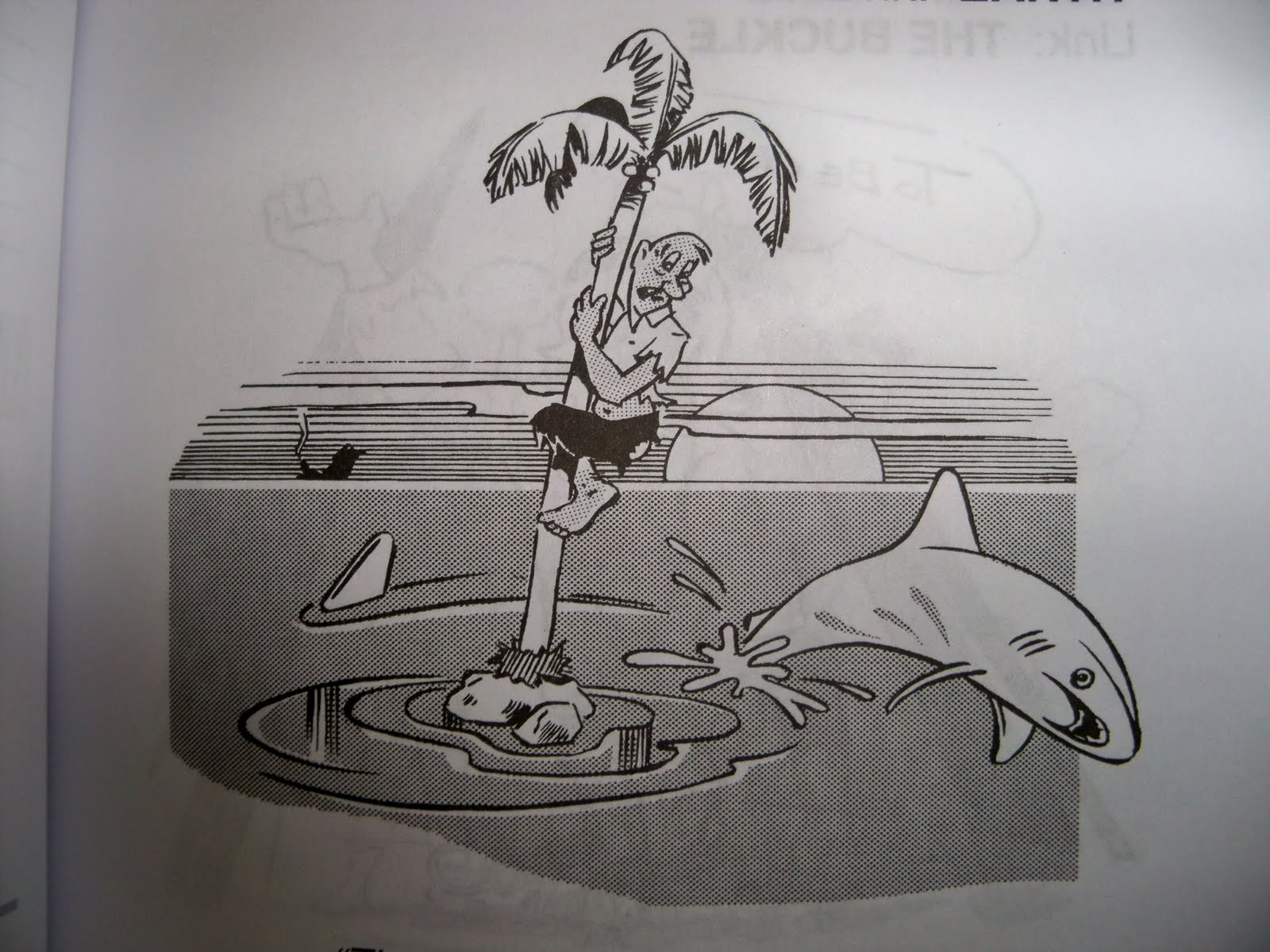
Here is one of the pictures in the book.
The caption for this cartoon is "There is a DEARTH of EARTH in the middle of the ocean."
The Link for this word is earth. So when I think of dearth, I should think of earth, and this picture or phrase should pop up into my head.
I like this book because the mnemonic devices are sound. When I was in the 4th grade my teacher used a mnemonic book to teach us the presidents. I remember Washington was a person washing a ton weight. And that's it. I cannot recall any of the other pictures and I didn't really learn that list of presidents (other than to regurgitate it for the test) until I taught my kids the list to the tune of "Ten Little Indians" But, I digress. The point is, that picture did not tie into the subject matter at all. But in this book, it does. There really is a dearth of earth in the middle of the ocean. Fossils really are docile. A broken down truck would make someone truculent. But I really doubt Washington ever washed a ton weight.
But as you know, it doesn't just matter that Mom likes a product. So the book went to Flower, 10, first. She read the first ten words before bed, and the next afternoon out of the blue I quizzed her using the review page. She not only remembered the words/definitions, but she could describe each picture and its caption. I know those words belong to her now.
Dragonette, 13, got the book next. She has a huge vocabulary, but there were plenty of words she did not know. And some of the words that she did know had alternate definitions listed in the book that she did not know (fleece = to swindle). I sent her to try things out.
In typical Dragonette fashion, she sat down and read the book in one evening. This was perhaps not the best use of this book. :o) She retained only few words (although she stated she was busy plugging those few new words into her writings). So I sent her back to read one section a day. The results for this surprised me. She could easily recall the definitions and describe the pictures, but she struggled with the Link word and the caption of the picture. I guess this is a good example of how different learners use this book.
At our house, we have a nice mix of visual and auditory learners and many products do not work well for all of us. This book does! There are so many things to latch on for each word, a person's brain can choose which device works best for each word.
About the only con I can come with for this book, is that it is not a full vocabulary program. If you need a lot of review for words, you would need to add in extra practice.
New Monic Books also sells Vocabulary Cartoons, Elementary Edition and Vocabulary Cartoons II, SAT Word Power. I am looking forward using these too.
Vocabulary Cartoons, SAT Word Power ($12.95 ISBN 9780965242233) is the book I looked at for this review. It is a 300+ page book of vocabulary fun. Fun? Yes, fun!
The book is divided into 29 sections. Each section has 10 words in it, for a total of 290 words. The 290 words are introduced in alphabetical order which makes looking up a word very easy. And after every 10 words there is a review page with matching and fill-in-the-blank questions to see what you remember.
Each word gets one page and on that page is
- the word
- the pronunciation
- the part of speech
- the definition
Okay, sounds like a regular old vocabulary book at this point. But then there is the
- the Link
- the cartoon
- the caption
- the examples
Here is one of the pictures in the book.
The caption for this cartoon is "There is a DEARTH of EARTH in the middle of the ocean."
The Link for this word is earth. So when I think of dearth, I should think of earth, and this picture or phrase should pop up into my head.
I like this book because the mnemonic devices are sound. When I was in the 4th grade my teacher used a mnemonic book to teach us the presidents. I remember Washington was a person washing a ton weight. And that's it. I cannot recall any of the other pictures and I didn't really learn that list of presidents (other than to regurgitate it for the test) until I taught my kids the list to the tune of "Ten Little Indians" But, I digress. The point is, that picture did not tie into the subject matter at all. But in this book, it does. There really is a dearth of earth in the middle of the ocean. Fossils really are docile. A broken down truck would make someone truculent. But I really doubt Washington ever washed a ton weight.
But as you know, it doesn't just matter that Mom likes a product. So the book went to Flower, 10, first. She read the first ten words before bed, and the next afternoon out of the blue I quizzed her using the review page. She not only remembered the words/definitions, but she could describe each picture and its caption. I know those words belong to her now.
Dragonette, 13, got the book next. She has a huge vocabulary, but there were plenty of words she did not know. And some of the words that she did know had alternate definitions listed in the book that she did not know (fleece = to swindle). I sent her to try things out.
In typical Dragonette fashion, she sat down and read the book in one evening. This was perhaps not the best use of this book. :o) She retained only few words (although she stated she was busy plugging those few new words into her writings). So I sent her back to read one section a day. The results for this surprised me. She could easily recall the definitions and describe the pictures, but she struggled with the Link word and the caption of the picture. I guess this is a good example of how different learners use this book.
At our house, we have a nice mix of visual and auditory learners and many products do not work well for all of us. This book does! There are so many things to latch on for each word, a person's brain can choose which device works best for each word.
About the only con I can come with for this book, is that it is not a full vocabulary program. If you need a lot of review for words, you would need to add in extra practice.
New Monic Books also sells Vocabulary Cartoons, Elementary Edition and Vocabulary Cartoons II, SAT Word Power. I am looking forward using these too.
Friday, September 10, 2010
America's Math Teacher
Today we are looking at America's Math Teacher, a web based math program.
America's Math Teacher
This program was designed by a math teacher to prepare kids for algebra by reinforcing topics already covered in any math program 4th grade - Algebra with a hybrid of drill and review.
This program has a few different components.
- Videos - There are 4 levels of web based videos to chose from (Basic Math Skills, Advanced Math Skills, Pre-Algebra Concepts and Algebra). When you subscribe, you have access to all the levels. This allows you to visit any topic needed for review while organizing the topics into common subjects, helping you to find what you are looking for faster.
- Worksheets - Each level has its own style of worksheets available to reinforce what was discussed in the video for that day. In the lower levels, there are daily drills on math facts, along with review problems on the topic of the day.
- Evaluation Center - Timed quizzes and exams to take after each topic is completed, to ensure mastery of the topic
- Resource Center - A list of NCTM Standards, worksheets, and speed drills in the same format found on the Basic and Advanced Math worksheets.
This program could work well if you have many kids to teach or an independent learner. You can still use your regular math program, but whenever a topic comes up that they can't quite remember, it can be quickly found in this program. Watch the video, print out a sheet, and try a few problems using that skill. Many of the programs features are downloaded as pdf files, so you could set folders up for each child, ready for them to open as needed. This program could also be used as a beginning of the year refresher or a summertime help to retain skills.
At our house, we have tried spiraling programs. But both of my children are big picture learners. They need the whole concept introduced without any other topics hanging around. They get extremely frustrated with bits and pieces. Because of this big picture learning, they tend to work a long time within a topic, doing harder and harder problems until they own that topic. Review makes them feel like they are going backwards, instead of continually nibbling small bites of the topic sandwich. And since this program isn't really designed for introducing topics without a primary instruction source (there is not a lot of "why this works" explanation), I found it very difficult to use this program. I have spent a lot of tough years understanding how my kids learn math, and deviation from this tends to lead to months of math frustration before we end up back on course. I tried this program briefly with my kids as instructed by the makers, but within a few lessons I was hearing the familiar frustrations and had to back off.
However, this program could work well if what you need is a drill based spiraling supplement or even just someone impartial to repeat and review topics for you. It would be especially handy if that explanation is needed when you are busy.
The Homeschool Memberships for this web based math instruction are priced at $195/year which gives you access to everything on the site. America's Math Teacher
You can also see free samples here.
America's Math Teacher Free Lessons
If a web based math is not what you are looking for, the creator of this program also has print materials available at the Math Essentials website.
Math Essentials
Wednesday, September 1, 2010
Vantage Learning
Everyone has spell check these days and many programs also have a grammar check. But Vantage Learning's My Access Writing Home Edition takes these ideas a bit further.
My Access Writing is a web based program that can be purchased for 1-3 students ($99.95/yr) or for 4-6 students ($129.95/yr) Its purpose is to help kids from 8 to 18 learn how to become better writers. My Access Writing Home Edition
Once you sign up, you create custom accounts for each of your children by:
We started out taking the methodical route. My 13 yo, Dragonette, breezed through the explanations and was off and writing within an hour. My 10 yo, Flower, did not enjoy such an easy leap into the program.
I guess I should back up a little here. At our house, I have not taught a lot of writing, but my kids love to write. They know about paragraphs and good grammar and whenever I see an issue in their writing, I point it out and use those as our teaching moments. Dragonette breathes writing and has multiple writing projects always going on. Flower also writes, but not with the single minded focus that Dragonette has. So I was honestly curious as to what this program would tell me about their writings.
Flower got bogged down in the explanations. So I helped her skip out of them and got her started on her first choice, "My Favorite Pet." Having never used the 5 paragraph system, she was soon in over her head again. She said all she felt she needed to say in the first paragraph! So I backed her up into the outline feature. Together, we created an outline as prompted by the program and it could be pulled up while she was writing. Now that she was organized, it took her very little time to prepare five paragraphs to be edited by the program.
Now here is the curious part about this program.
- focus
- content development
- organization
- language style
- conventions
With Dragonette, this did not work well. There were a lot of false errors in her writing, as she tends to use complicated sentence structure. Software always has trouble with the English language and its exceptions to the rules, and Dragonette's writing brought out the worst of these false errors. The program developers do admit this can be a problem, and I concluded that her grammar is beyond what this program can offer.
But that still leaves Flower. And despite her trouble with the initial explanations, I found that this program did a good job organizing her to write and finding her errors. And better yet, surprisingly, I became her ally. Together, we went through the errors the program found, and schemed how we could outsmart the editor by reworking things. In the end, her score came up, I was not the bad guy for once, and she learned some new writing skills.
So overall, if your child is a good writer, you may not be able to use this program to its full potential, other than to use the topics and keep writing assignments organized. But if you have a child that needs some organizing and loves to fight you, this program may be exactly what you need.
My Access Writing is a web based program that can be purchased for 1-3 students ($99.95/yr) or for 4-6 students ($129.95/yr) Its purpose is to help kids from 8 to 18 learn how to become better writers. My Access Writing Home Edition
Once you sign up, you create custom accounts for each of your children by:
- Choosing which levels of writing exercises they can have access to (any combination of ages 8-10, 11-14, and 14-18).
- Picking which topics they can try, which are arranged by style of writing (informative, narrative, and persuasive). This is customizable at any time. You can also add your own topics.
- Assigning a point value to strive for, a deadline, and rewards for reaching the goal.
- Picking up to 7 email addresses to automatically send weekly progress reports to (think Grandma)
********************************************
1. Be methodical and go through the tutorial on how to use the program. This includes:- Course Overview - Explanation of the writing style
- Chief Reporter Training - Multi step explanation of writing, its vocabulary, and a quiz Rubric Training - Introduction to using a rubric with another quiz
- Pre-writing - An interactive graphic organizer
- Once you work through the modules (earning points for doing it), you are ready to start writing.
- Access to basic word processing tools, such as bold and align left.
- "My Outline" provides a place to write an outline or refer to the one you have already made.
- "My Checklist" provides a list of things to look for in your writing.
- "Writer's Toolbox" includes writing vocabulary and definitions (protagonist, for example) and a cool thesaurus that you can use to bump up the complexity of the words you use.
- "Writer's Course" is available if you get stuck and need a quick tutorial.
******************************************
We started out taking the methodical route. My 13 yo, Dragonette, breezed through the explanations and was off and writing within an hour. My 10 yo, Flower, did not enjoy such an easy leap into the program.
I guess I should back up a little here. At our house, I have not taught a lot of writing, but my kids love to write. They know about paragraphs and good grammar and whenever I see an issue in their writing, I point it out and use those as our teaching moments. Dragonette breathes writing and has multiple writing projects always going on. Flower also writes, but not with the single minded focus that Dragonette has. So I was honestly curious as to what this program would tell me about their writings.
Flower got bogged down in the explanations. So I helped her skip out of them and got her started on her first choice, "My Favorite Pet." Having never used the 5 paragraph system, she was soon in over her head again. She said all she felt she needed to say in the first paragraph! So I backed her up into the outline feature. Together, we created an outline as prompted by the program and it could be pulled up while she was writing. Now that she was organized, it took her very little time to prepare five paragraphs to be edited by the program.
Now here is the curious part about this program.
- It grades your writing (below, proficient, advanced) in 6 categories
- focus
- content development
- organization
- language style
- conventions
- A "Revision Plan" is set up for you with examples and suggestions, like highlighting the main ideas and supporting sentences. This allows you to see how organized your writing is.
- Once the revision is started, click on "My Editor" and all the places the program feels you can improve spelling and grammar are highlighted. You can chose to have these errors pointed out to you in English, Spanish, Chinese, Japanese, Korean, Simplified Chinese, or British English. This is a great tool for those that are writing in American English as a second language!
With Dragonette, this did not work well. There were a lot of false errors in her writing, as she tends to use complicated sentence structure. Software always has trouble with the English language and its exceptions to the rules, and Dragonette's writing brought out the worst of these false errors. The program developers do admit this can be a problem, and I concluded that her grammar is beyond what this program can offer.
But that still leaves Flower. And despite her trouble with the initial explanations, I found that this program did a good job organizing her to write and finding her errors. And better yet, surprisingly, I became her ally. Together, we went through the errors the program found, and schemed how we could outsmart the editor by reworking things. In the end, her score came up, I was not the bad guy for once, and she learned some new writing skills.
So overall, if your child is a good writer, you may not be able to use this program to its full potential, other than to use the topics and keep writing assignments organized. But if you have a child that needs some organizing and loves to fight you, this program may be exactly what you need.
Subscribe to:
Posts (Atom)